[Graphics/SFML] SFML을 이용한 간단한 게임
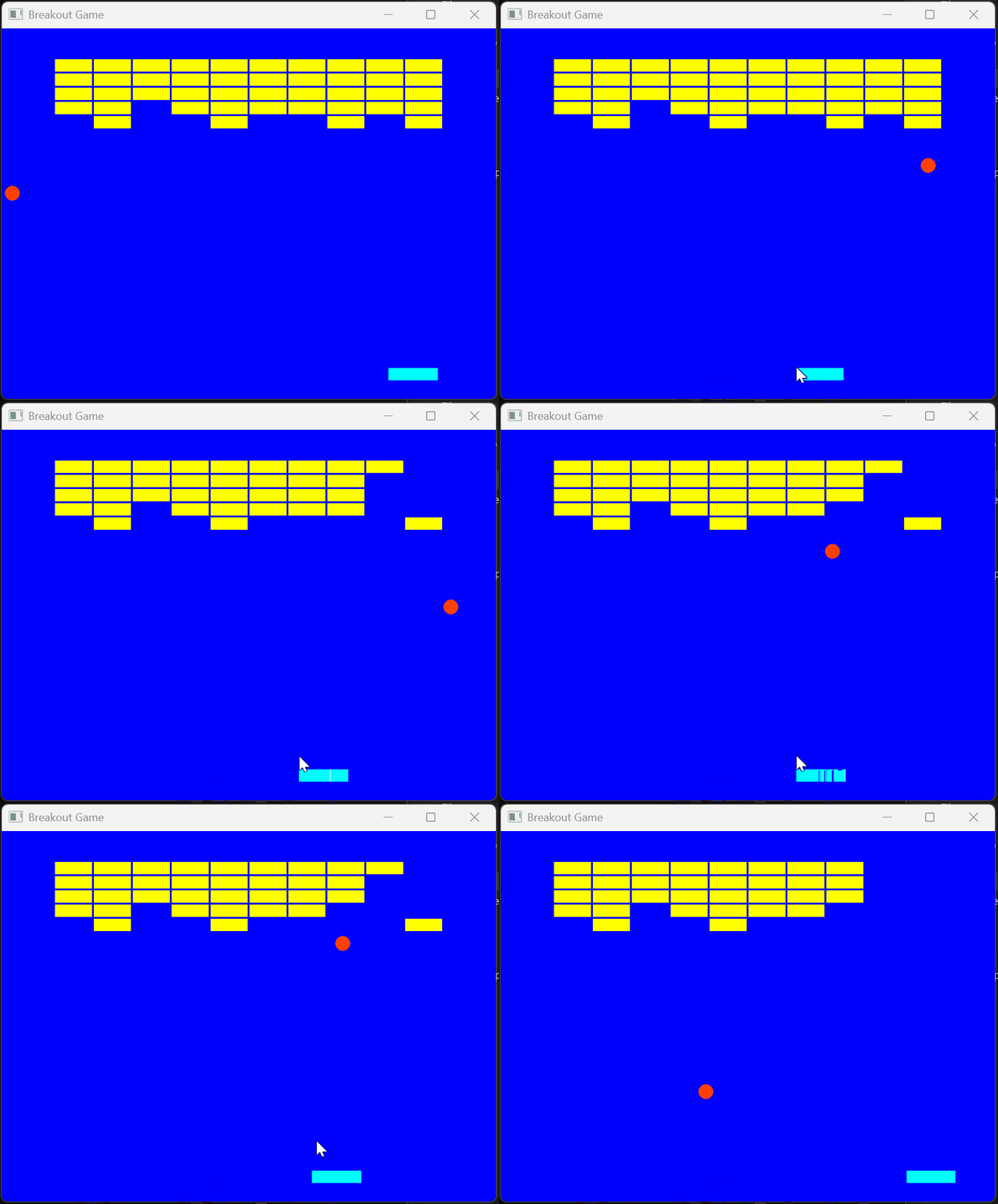
SFML의 기본 개념을 소개하고 C++로 간단한 벽돌깨기 게임을 만들어보는 글이다. 윈도우 생성, 렌더링, 입력 처리, 게임 루프 구조까지 단계별로 정리한다.
SFML이란?
SFML(Simple and Fast Multimedia Library)은 C++용 크로스플랫폼 멀티미디어 라이브러리이다.
SFML은 OpenGL 위에 구축된 2D그래픽, 오디오, 네트워크, 윈도우 관리를 추상화한 라이브러리이다. DirectX, OpenGL 같은 저수준 API와 달리, 빠른 프로토타이핑과 학습을 목적으로 설계되었다.
SFML 5개의 모듈 구조
- System
- 타이머, 스레드, 벡터 등 기반 유틸리티
- Window
- OS 윈도우 생성, 입력(키보드/마우스) 처리
- Graphics
- 2D 렌더링(스프라이트, 텍스처, 셰이더, RenderTexture)
- Audio
- 사운드 재생(OpenAL 기반)
- Network
- TCP/UDP 소켓
SFML Breakout Game
Breakout Game 시작하기에 앞서…
Setting up and SFML Project in Visual Studio
SFML에 가서 라이브러리를 다운 받는다.
 그 후,
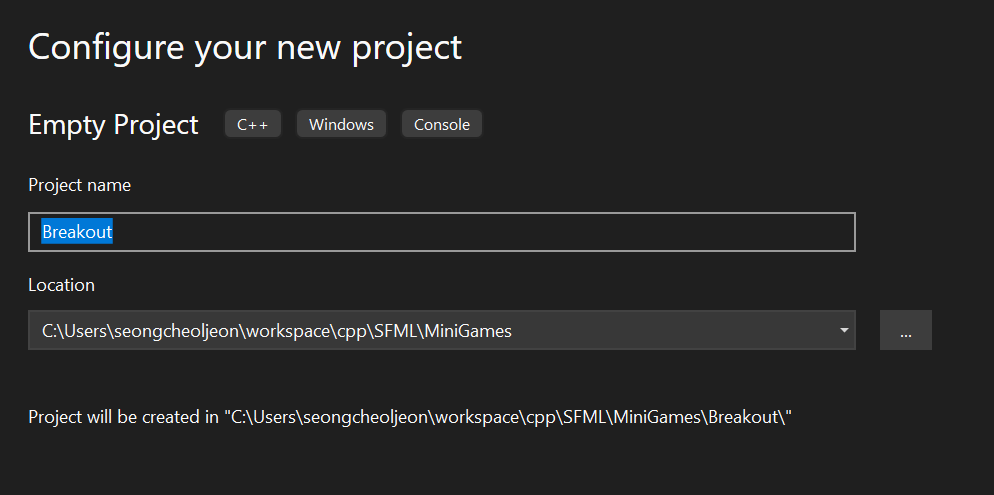
그 후, visual studio에서 Empty Project 생성 후, Property Pages로 가서 다음과 같이 설정한다.
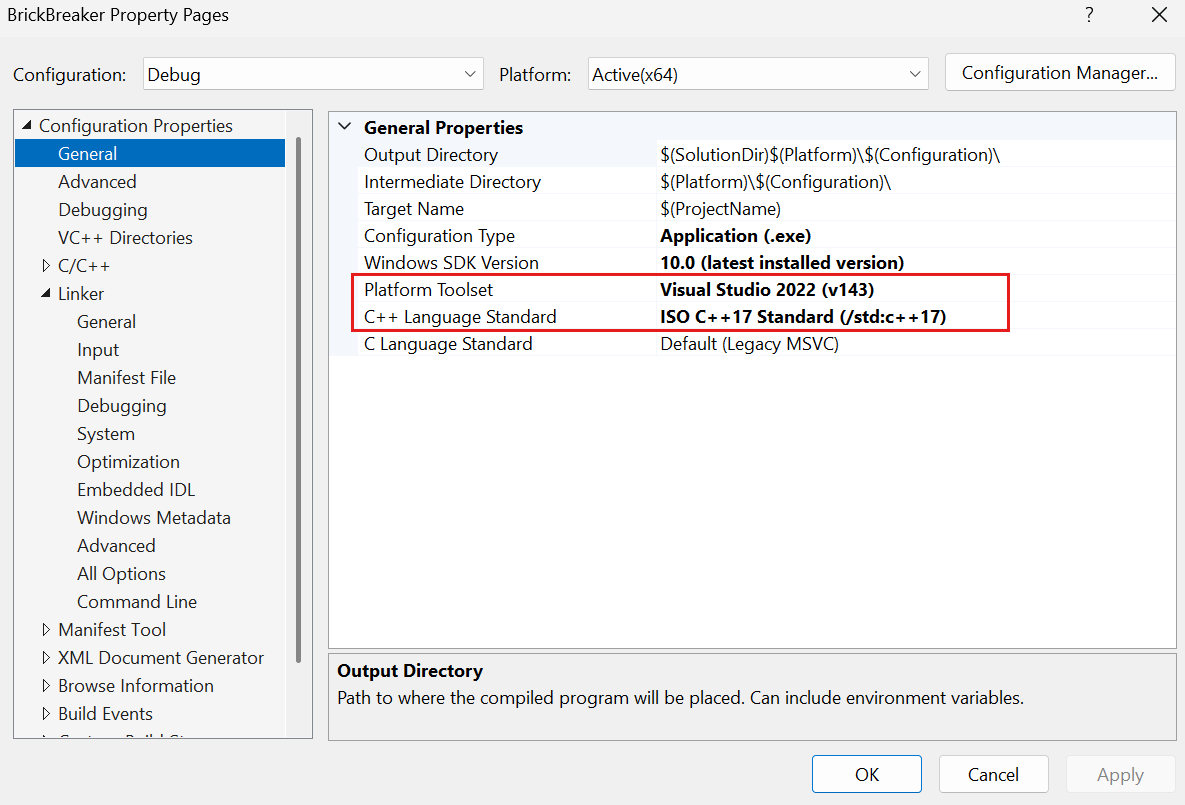 Property -> General
- Platform Toolset -> Visual Studio 202 (v143)으로 변경
- C++ Language Standard -> ISO C++ 17 Standard (/std:c++ 17)로 변경
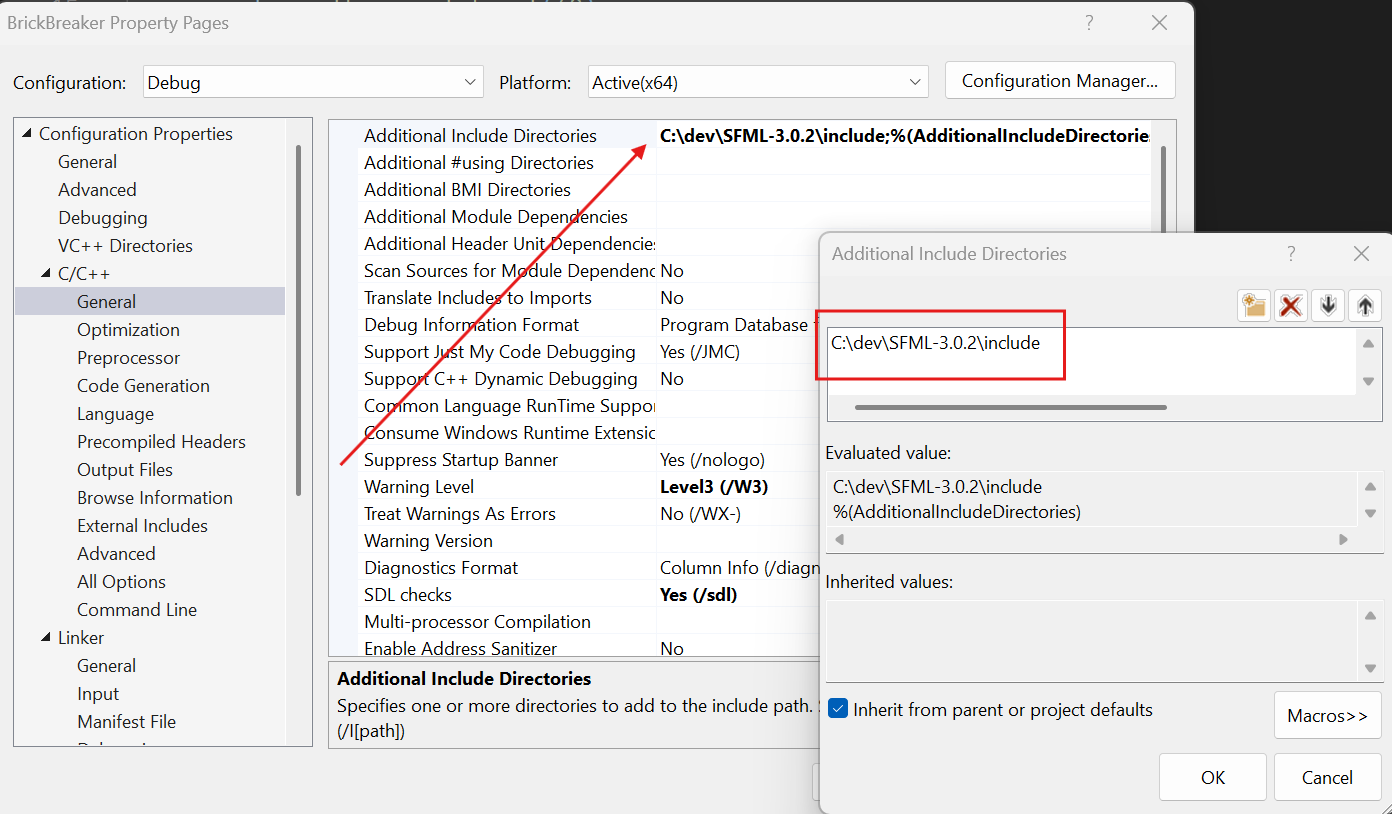 Property -> C/C++ -> General
- Additional Include Directories -> SFML
include디렉토리 추가
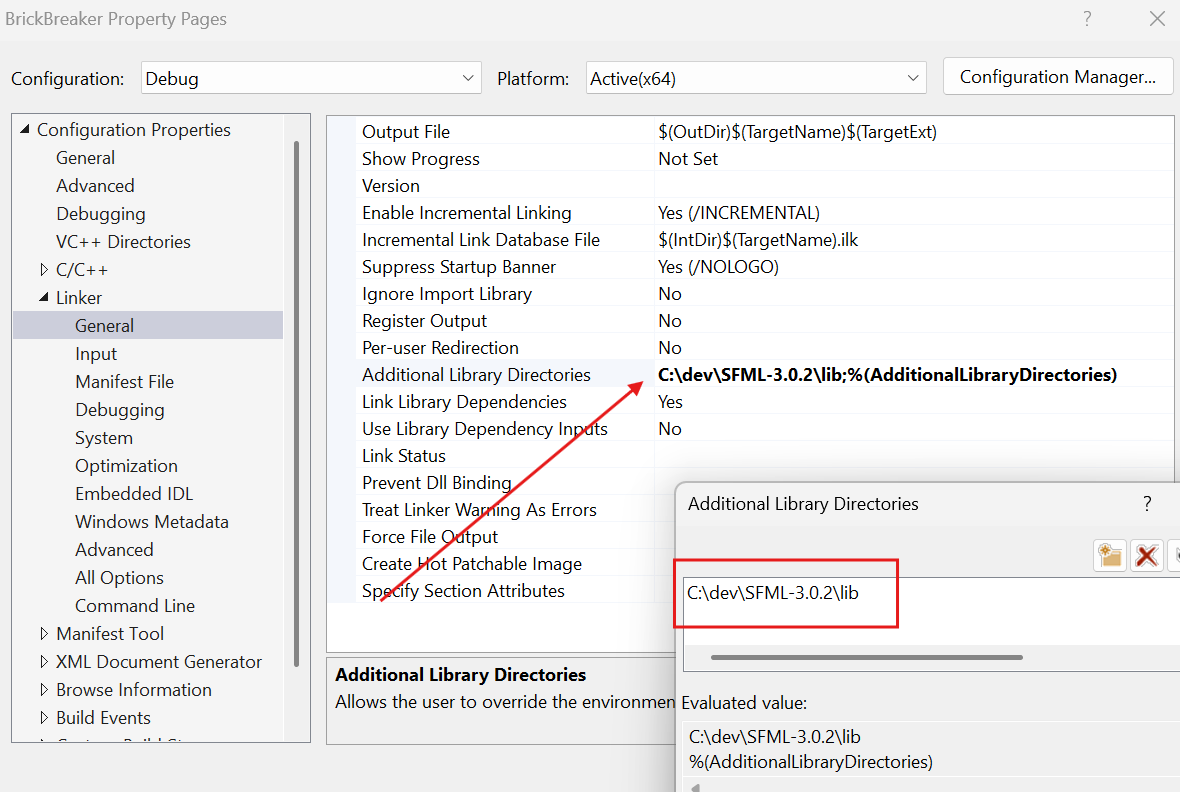 Property -> Linker -> General
- Additional Library Directories -> SFML
lib디렉토리 추가
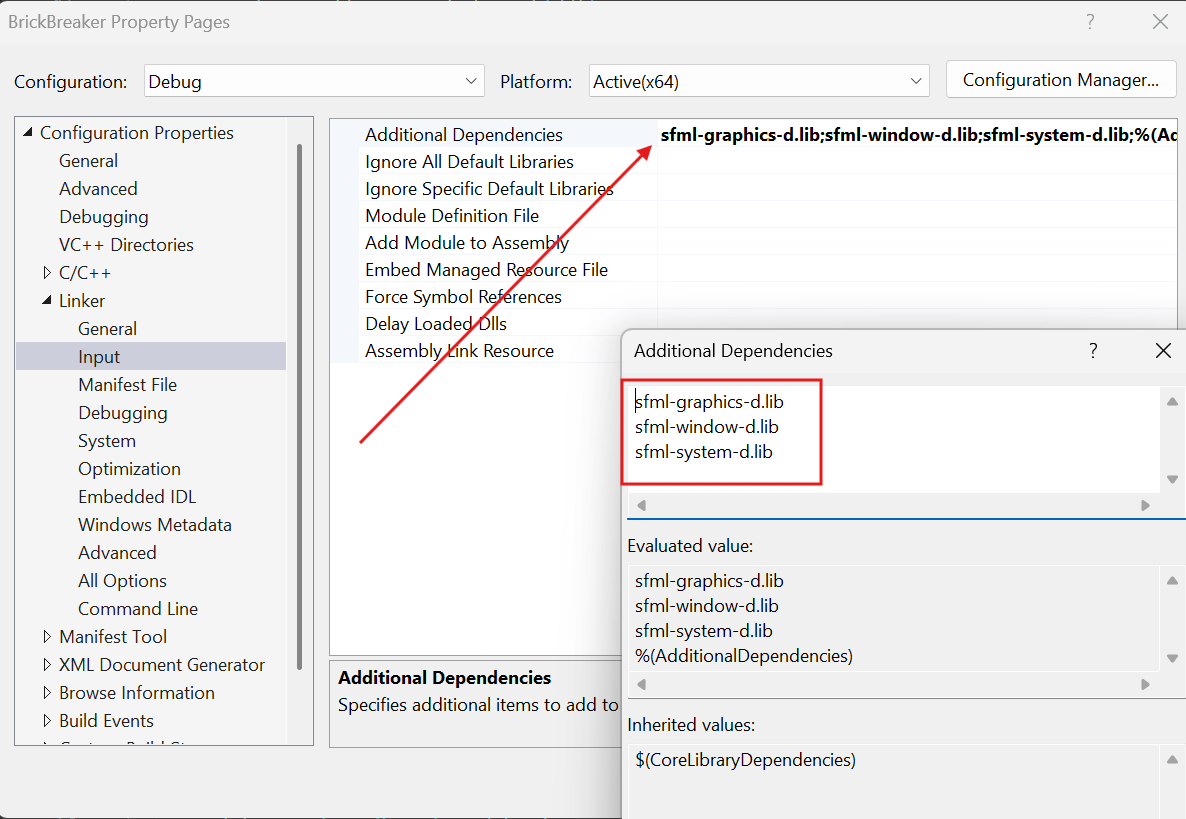 Property -> Linker -> Input
- Additional Dependencies -> SFML
lib파일들 추가- sfml-graphics-d.lib
- sfml-window-d.lib
- sfml-system-d.lib
화면 작성
화면에 무엇인가를 그리려면 특수한 윈도우인 sf::RenderWindow를 사용하여야 한다. sf::Window 및 모든 기능을 상속받은 자식 윈도우이다. 모든 sf::Window(생성, 이벤트 처리, 프레임 속도 제어, OpenGL사용)의 기능은 sf::RenderWindow에서 사용할 수 있다.
sf::RenderWindow는 쉽게 그림을 그릴 수 있도록 sf::Window에 높은 수준의 기능을 추가한다.
clear()- 선택한 색상으로 전체 윈도우를 지운다.
draw()- 전달한 객체를 화면에 그린다.
현재까지의 전체 소스는 다음과 같다.
아래의 코드는 윈도우를 하나 만들고 사용자가 윈도우를 닫을 때 종료된다. sfml 프로그램은 이런 종류의 루프를 가지며 메인 루프 또는 게임 루프(game loop)라고 불린다.
게임 루프 내에서 제일 먼저 하는 일은 발생한 모든 이벤트를 확인하는 것이다. 보류중인 모든 이벤트가 처리될 수 있도록 while 루프를 사용한다.
pollEvent()- 이 함수는 이벤트가 처리기기대기 중이면
true를 반환하고 그렇지 않으면false를 반환한다.
1
2
3
4
5
6
7
8
9
10
11
12
13
14
15
16
17
18
19
20
21
22
23
24
25
26
27
28
29
30
 #include <SFML/Graphics.hpp>


int main()
{
    // 윈도우 생성
    sf::RenderWindow window(sf::VideoMode({
        static_cast<unsigned>(800), static_cast<unsigned>(600) }), "Breakout Game");
    window.setFramerateLimit(60);

    // 윈도우가 오픈되어 있는 한 프로그램을 실행한다.
    while (window.isOpen())
    {
        window.clear(sf::Color::Blue);

        // 윈도우의 이벤트를 처리한다.
        while (const std::optional<sf::Event> event = window.pollEvent())
        {
            if (event->is<sf::Event::Closed>())
            {
                window.close();
            }
        }

        // 현재 프레임을 종료한다.
        window.display();
    }

    return 0;
}
이것을 실행해 보자. 그러면 다음과 같은 에러 메시지를 볼 것이다. 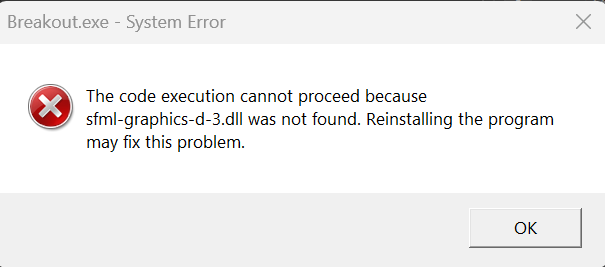 System Error
이것은 SFML의 dll파일들이 없어서 나오는 문제이므로 해당 dll들을 프로젝트 디렉토리에 모두 복사해 주자.
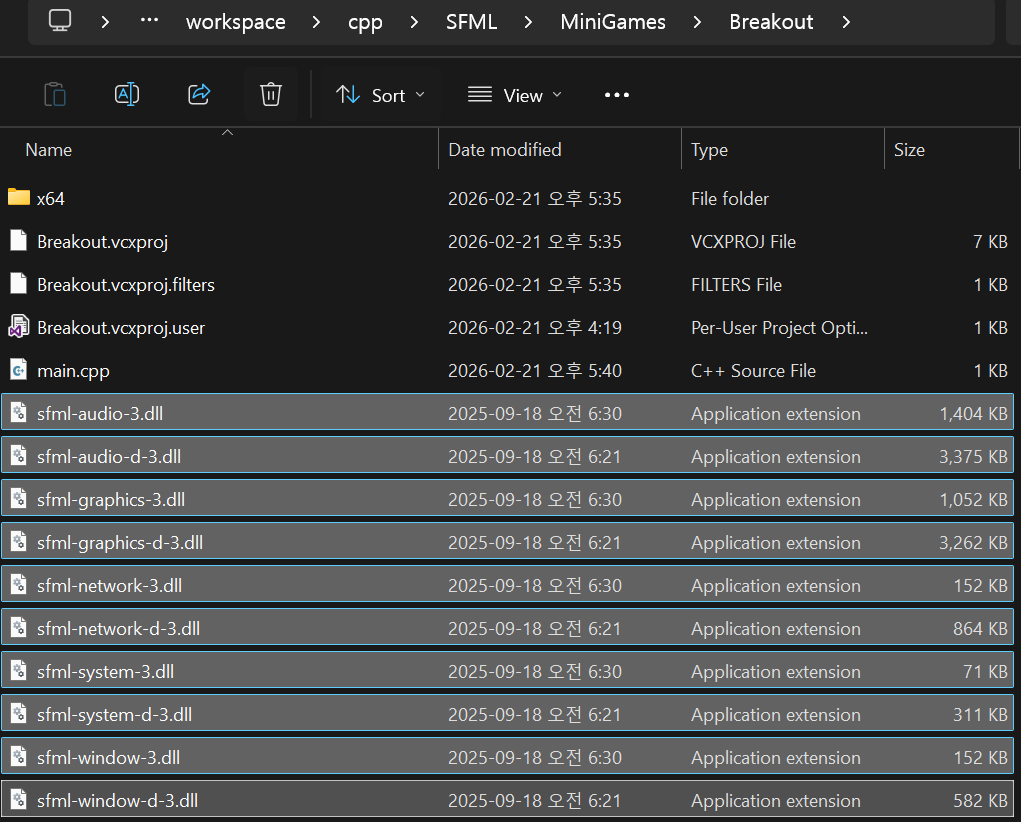 복사한 모습
SFML 디렉토리/bin에 존재하는 모든dll파일들을프로젝트 디렉토리에 복사한다.
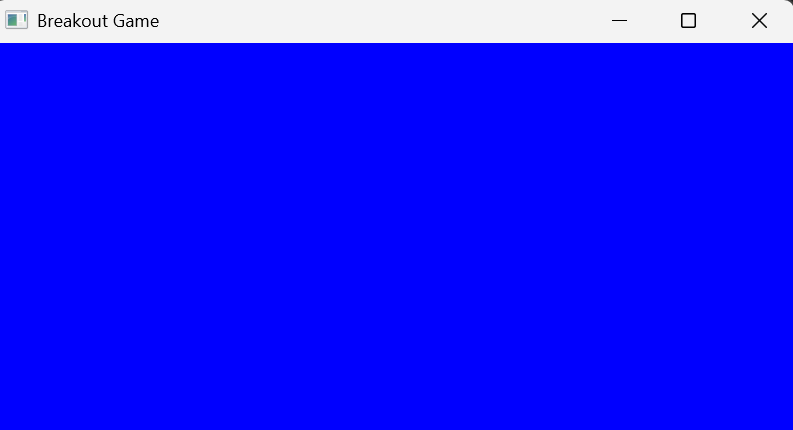
그러면, 파란색 화면을 볼 수 있을 것이다.
공을 화면에 그려보자.
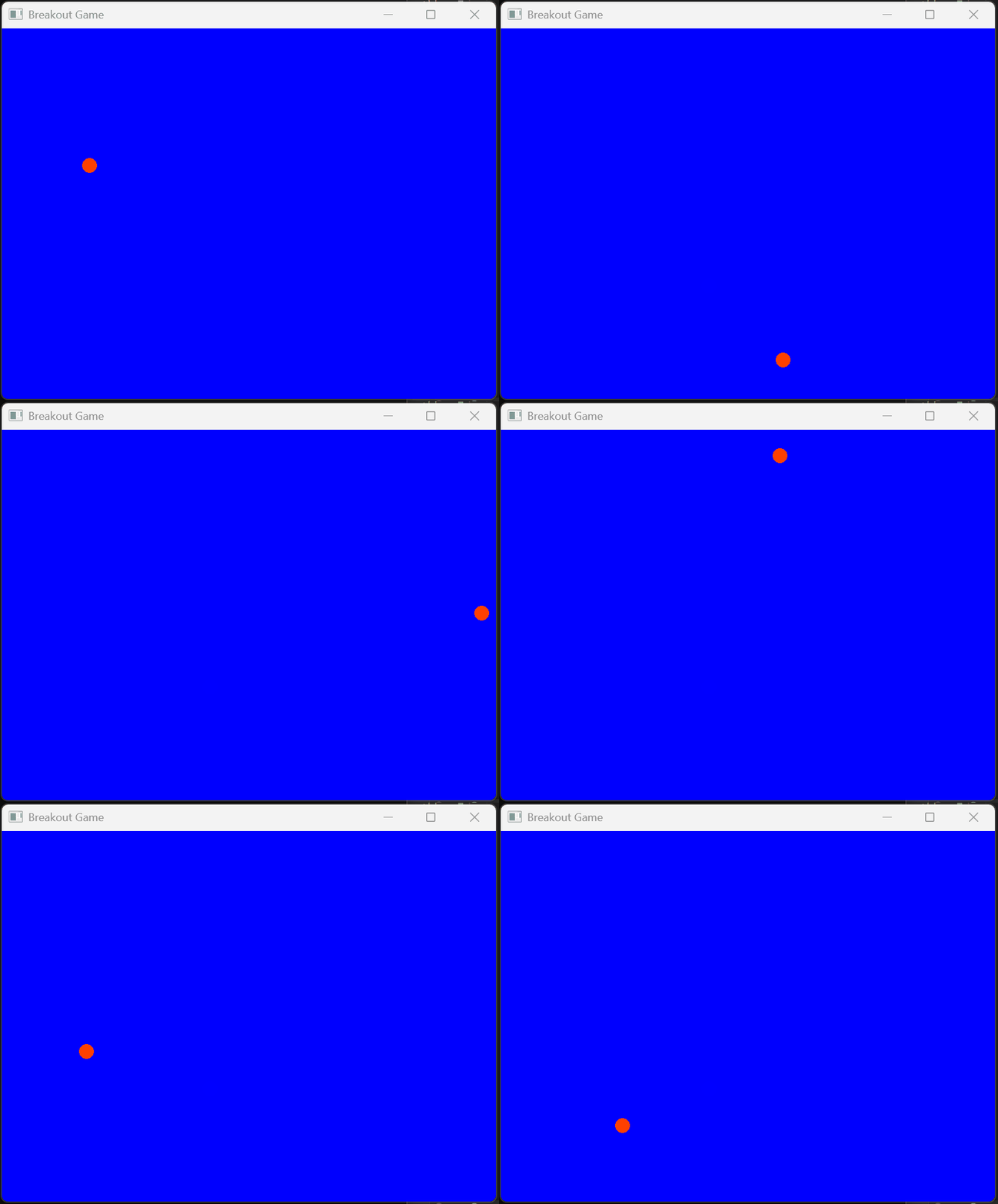
공을 클래스로 정의하고 객체를 생성하여 화면에 표시해 보자.
Ball 클래스는 CircleShape이라는 클래스를 상속받아 작성한다.
1
2
3
class Ball : public sf::CircleShape
{
};
Ball(float x, float y) 생성자는 외부로부터 공의 위치를 받아, 객체를 생성한다. 객체가 생성되면서 부모 클래스의 생성자인 CircleShape(12.0)이 호출된다. 12.0은 공의 반지름이다.o
1
2
3
4
5
6
Ball(float x, float y) : sf::CircleShape(12.0f)
{
    setPosition(sf::Vector2f(x, y)); // 공의 위치 설정
    setFillColor(sf::Color(255, 128, 0)); // 공의 색상 설정
    setOrigin(sf::Vector2f(0, 0)); // 공의 원점 설정
}
update() 함수는 공의 현재 위치를 이동한다. 공이 벽에 부딪치면 공의 방향을 변경하는 코드도 가지고 있다.
1
2
3
4
5
6
7
8
9
10
11
12
13
14
15
16
17
18
19
20
void update()
{
    move(sf::Vector2f(_speedx, _speedy)); // 공의 위치 업데이트
    if (getPosition().x < 0) // 왼쪽 벽과 충돌
    {
        _speedx = BALL_SPEED; // 오른쪽으로 이동
    }
    else if ((getPosition().x + 2 * 20) > 800) // 오른쪽 벽과 충돌
    {
        _speedx = -BALL_SPEED; // 왼쪽으로 이동
    }
    if (getPosition().y < 0) // 위쪽 벽과 충돌
    {
        _speedy = BALL_SPEED; // 아래로 이동
    }
    else if ((getPosition().y + 2 * 20) > 600) // 아래쪽 벽과 충돌
    {
        _speedy = -BALL_SPEED; // 위로 이동
    }
}
현재까지의 전체 소스코드는 다음과 같다.
1
2
3
4
5
6
7
8
9
10
11
12
13
14
15
16
17
18
19
20
21
22
23
24
25
26
27
28
29
30
31
32
33
34
35
36
37
38
39
40
41
42
43
44
45
46
47
48
49
50
51
52
53
54
55
56
57
58
59
60
61
62
63
64
65
66
67
68
69
70
71
#include <SFML/Graphics.hpp>

static constexpr float BALL_SPEED = 5.0f;


class Ball : public sf::CircleShape
{
public:
    Ball(float x, float y);
    void update(); // 공의 위치 업데이트

private:
    float _speedx = BALL_SPEED, _speedy = BALL_SPEED;
};

Ball::Ball(float x, float y) : sf::CircleShape(12.0f)
{
    setPosition(sf::Vector2f(x, y)); // 공의 위치 설정
    setFillColor(sf::Color(255, 64, 0)); // 공의 색상 설정
    setOrigin(sf::Vector2f(0, 0)); // 공의 원점 설정
}

void Ball::update()
{
    move(sf::Vector2f(_speedx, _speedy)); // 공의 위치 업데이트
    if (getPosition().x < 0) // 왼쪽 벽과 충돌
    {
        _speedx = BALL_SPEED; // 오른쪽으로 이동
    }
    else if ((getPosition().x + 2 * 20) > 800) // 오른쪽 벽과 충돌
    {
        _speedx = -BALL_SPEED; // 왼쪽으로 이동
    }
    if (getPosition().y < 0) // 위쪽 벽과 충돌
    {
        _speedy = BALL_SPEED; // 아래로 이동
    }
    else if ((getPosition().y + 2 * 20) > 600) // 아래쪽 벽과 충돌
    {
        _speedy = -BALL_SPEED; // 위로 이동
    }
}


int main()
{
    Ball ball{ 800.0 / 2, 600.0 / 2 };

    sf::RenderWindow window(sf::VideoMode(sf::Vector2u(
        static_cast<unsigned>(800), static_cast<unsigned>(600) )), "Breakout Game");
    window.setFramerateLimit(60);

    while (window.isOpen())
    {
        window.clear(sf::Color::Blue);

        while (const std::optional<sf::Event> event = window.pollEvent())
        {
            if (event->is<sf::Event::Closed>())
            {
                window.close();
            }
        }

        ball.update();
        window.draw(ball);
        window.display();
    }

    return 0;
}
패들과 벽돌을 화면에 그려보자.
패들과 벽돌은 모두 사각형이므로 RectangleShape에서 상속받자.
Paddle
패들을 나타내는 Paddle 클래스를 살펴보자. 멤버 변수로는 패들의 초기 위치를 나타내는 _init_x, _init_y가 추가되었다.
1
2
3
4
5
6
7
8
9
class Paddle : public sf::RectangleShape
{
public:
    Paddle(float x, float y);
    void update(int x); // 패들의 위치 업데이트

private:
    float _init_x, _init_y;
};
update() 함수는 패들의 위치를 설정하는데 사용된다. 패들은 x방향으로만 움직이므로 마우스에서 위치를 받아 패들의 위치를 설정한다.
1
2
3
4
void Paddle::update(int x)
{
    setPosition(sf::Vector2f(x, _init_y)); // 패들의 위치 업데이트
}
Brick
벽돌을 나타내는 Brick 클래스도 RectangleShape을 상속받아 작성된다. 멤버 변수로는 _is_destroyed가 있는데 공이 벽돌을 맞추는 경우, 벽돌이 소멸되어야 하기 때문이다.
1
2
3
4
5
6
7
8
class Brick : public sf::RectangleShape
{
public:
    Brick(float x, float y);

private:
    bool _is_destroyed = false;
};
중요한 코드는 바로 벽돌을 여러 개 생성하는 코드이다.
1
2
3
4
5
6
7
8
9
std::vector<Brick> bricks;

for (int x = 0; x < 10; x++)
{
    for (int y = 0; y < 5; y++)
    {
        bricks.push_back(Brick(x * (60 + 3) + 20, y * (20 + 3) + 4));
    }
}
현재까지의 main 소스는 다음과 같다.
1
2
3
4
5
6
7
8
9
10
11
12
13
14
15
16
17
18
19
20
21
22
23
24
25
26
27
28
29
30
31
32
33
34
35
36
37
38
39
40
41
42
43
44
45
46
47
48
49
50
51
52
53
54
55
56
57
58
59
60
61
62
63
#include <SFML/Graphics.hpp>
#include <vector>
#include "Ball.h"
#include "Paddle.h"
#include "Brick.h"


int main()
{
    Ball ball{ 800.0 / 2, 600.0 / 2 };
    Paddle paddle{ 800.0 / 2, 550.0 };
    std::vector<Brick> bricks;

    const int brickWidth = 60;
    const int brickHeight = 20;
    const int brickSpacing = 3;
    const int columns = 10;
    const int rows = 5;

    const float gridWidth = columns * brickWidth + (columns - 1) * brickSpacing;
    const float startX = (800.0f - gridWidth) / 2.0f;
    const float startY = 50.0f;

    for (int x = 0; x < columns; x++)
    {
        for (int y = 0; y < rows; y++)
        {
            bricks.push_back(Brick(startX + x * (brickWidth + brickSpacing),
                                   startY + y * (brickHeight + brickSpacing)));
        }
    }

    sf::RenderWindow window(sf::VideoMode(sf::Vector2u(
        static_cast<unsigned>(800), static_cast<unsigned>(600) )), "Breakout Game");
    window.setFramerateLimit(60);

    while (window.isOpen())
    {
        window.clear(sf::Color::Blue);

        while (const std::optional<sf::Event> event = window.pollEvent())
        {
            if (event->is<sf::Event::Closed>())
            {
                window.close();
            }
        }

        ball.update();

        window.draw(ball);
        window.draw(paddle);

        for (const auto& brick : bricks)
        {
            window.draw(brick);
        }

        window.display();
    }

    return 0;
}
패들 이동 및 충돌 처리
Paddle
패들을 마우스에 따라 움직이고, 공이 패들에서 반사되게 하며, 공이 벽돌에 부딪치면 벽돌이 소멸되도록 하자.
마우스의 좌표를 얻는 코드
1
paddle.update(sf::Mouse::getPosition(window).x);
공이 패들에 반사되게 하려면 공이 패들과 충돌하였는지를 검사해야 한다. 게임에서 충돌 검사는 아주 중요한 부분으로 공이 감싸는 사각형과 패들을 감싸는 사각형이 겹치는 지를 검사하면 된다.
Ball 클래스의 멤버 함수로 IsIntersecting()를 작성하자. 해당 메소드는 공 객체와 패들 객체가 충돌하였는지 getGlobalBounds().intersects()를 호출하여 알아낸다.
- getGlobalBounds()
- 객체를 감싸는 사각형 객체를 반환
- intersects()
- 사각형이 겹치는 지를 판단
1
2
3
4
bool Ball::IsIntersecting(Paddle& paddle) const
{
    return getGlobalBounds().findIntersection(paddle.getGlobalBounds()).has_value();
}
공이 패들과 충돌하면 반사되어야 한다.
1
2
3
4
5
6
7
8
9
10
11
12
void Ball::HandleCollision(Paddle& paddle)
{
    if (!IsIntersecting(paddle))
    {
        return;
    }

    _speedy = -BALL_SPEED; // 공의 수직 방향 속도 반전
    _speedx = (getPosition().x < paddle.getPosition().x)
        ?  _speedx = -BALL_SPEED
        : _speedx = BALL_SPEED;
}
공과 패들이 충돌하면 공의 속도를 음수로 만들면 공이 위쪽으로 방향을 변경한다. 공의 x좌표와 패들의 x좌표를 비교하여 공의 x축 방향도 변경한다.
Brick
공이 벽돌과 충돌하면 벽돌 객체는 삭제되어야 한다. 이것을 위해 벡터 안의 모든 벽돌 객체와 공과의 충돌을 검사한다. 충돌이 발생한 벽돌 객체는 _is_destroyed 변수가 true로 설정된다.
1
2
3
4
for(auto& brick: bricks)
{
  brick.HandleCollision(ball);
}
이어서 STL알고리즘의 remove_if()와 erase() 함수를 사용한다. remove_if() 함수는 조건을 만족하는 객체들을 표시하고, erase() 함수는 이들 객체를 벡터에서 삭제한다.
1
2
3
4
5
6
bricks.erase(std::remove_if(bricks.begin(), bricks.end()
    , [](Brick& b) -> bool
    {
        return b.IsDestroyed();
    }
), bricks.end());
최종 결과
전체 소스는 다음과 같다.
Ball
1
2
3
4
5
6
7
8
9
10
11
12
13
14
15
16
17
18
19
20
#pragma once

#include <SFML/Graphics.hpp>

static constexpr float BALL_SPEED = 5.0f;


class Ball : public sf::CircleShape
{
public:
    Ball(float x, float y);
    void update(); // 공의 위치 업데이트
    bool IsIntersecting(class Paddle& paddle) const;
    void HandleCollision(class Paddle& paddle);
    void ReverseSpeedX();
    void ReverseSpeedY();

private:
    float _speedx = BALL_SPEED, _speedy = BALL_SPEED;
};
1
2
3
4
5
6
7
8
9
10
11
12
13
14
15
16
17
18
19
20
21
22
23
24
25
26
27
28
29
30
31
32
33
34
35
36
37
38
39
40
41
42
43
44
45
46
47
48
49
50
51
52
53
54
55
56
57
58
59
#include "Ball.h"
#include "Paddle.h"


Ball::Ball(float x, float y) : sf::CircleShape(12.0f)
{
    setPosition(sf::Vector2f(x, y)); // 공의 위치 설정
    setFillColor(sf::Color(255, 64, 0)); // 공의 색상 설정
    setOrigin(sf::Vector2f(0, 0)); // 공의 원점 설정
}

void Ball::update()
{
    move(sf::Vector2f(_speedx, _speedy)); // 공의 위치 업데이트
    float ballDiameter = getRadius() * 2;

    if (getPosition().x < 0) // 왼쪽 벽과 충돌
    {
        _speedx = BALL_SPEED; // 오른쪽으로 이동
    }
    else if ((getPosition().x + ballDiameter) > 800) // 오른쪽 벽과 충돌
    {
        _speedx = -BALL_SPEED; // 왼쪽으로 이동
    }
    if (getPosition().y < 0) // 위쪽 벽과 충돌
    {
        _speedy = BALL_SPEED; // 아래로 이동
    }
    else if ((getPosition().y + ballDiameter) > 600) // 아래쪽 벽과 충돌
    {
        _speedy = -BALL_SPEED; // 위로 이동
    }
}

bool Ball::IsIntersecting(Paddle& paddle) const
{
    return getGlobalBounds().findIntersection(paddle.getGlobalBounds()).has_value();
}

void Ball::HandleCollision(Paddle& paddle)
{
    if (!IsIntersecting(paddle))
    {
        return;
    }

    _speedy = -BALL_SPEED; // 공의 수직 방향 속도 반전
    _speedx = (getPosition().x < paddle.getPosition().x) ? -BALL_SPEED : BALL_SPEED;
}

void Ball::ReverseSpeedX()
{
    _speedx = -_speedx;
}

void Ball::ReverseSpeedY()
{
    _speedy = -_speedy;
}
Paddle
1
2
3
4
5
6
7
8
9
10
11
12
13
14
#pragma once

#include <SFML/Graphics.hpp>


class Paddle : public sf::RectangleShape
{
public:
    Paddle(float x, float y);
    void update(int x); // 패들의 위치 업데이트

private:
    float _init_x, _init_y;
};
1
2
3
4
5
6
7
8
9
10
11
12
13
14
15
#include "Paddle.h"


Paddle::Paddle(float x, float y) : _init_x(x), _init_y(y)
{
    setSize(sf::Vector2f(80.0f, 20.0f)); // 패들의 크기 설정
    setPosition(sf::Vector2f(x, y)); // 패들의 위치 설정
    setFillColor(sf::Color(0, 255, 255)); // 패들의 색상 설정
    setOrigin(sf::Vector2f(0, 0)); // 패들의 원점 설정
}

void Paddle::update(int x)
{
    setPosition(sf::Vector2f(x, _init_y)); // 패들의 위치 업데이트
}
Brick
1
2
3
4
5
6
7
8
9
10
11
12
13
14
15
16
#pragma once

#include <SFML/Graphics.hpp>


class Brick : public sf::RectangleShape
{
public:
    Brick(float x, float y);
    bool IsIntersecting(class Ball& ball) const;
    void HandleCollision(class Ball& ball);
    bool IsDestroyed() const;

private:
    bool _is_destroyed = false;
};
1
2
3
4
5
6
7
8
9
10
11
12
13
14
15
16
17
18
19
20
21
22
23
24
25
26
27
28
29
30
31
32
33
34
35
36
37
38
39
40
41
42
43
44
45
46
47
48
49
50
51
#include "Brick.h"
#include "Ball.h"


Brick::Brick(float x, float y)
{
    setSize(sf::Vector2f(60.0f, 20.0f)); // 벽돌의 크기 설정)
    setPosition(sf::Vector2f(x, y)); // 벽돌의 위치 설정
    setFillColor(sf::Color(255, 255, 0)); // 벽돌의 색상 설정
    setOrigin(sf::Vector2f(0, 0)); // 벽돌의 원점 설정
}

bool Brick::IsIntersecting(Ball& ball) const
{
    return getGlobalBounds().findIntersection(ball.getGlobalBounds()).has_value();
}

void Brick::HandleCollision(Ball& ball)
{
    if (!IsIntersecting(ball))
    {
        return;
    }

    _is_destroyed = true;

    auto ballBounds = ball.getGlobalBounds();
    auto brickBounds = getGlobalBounds();

    float ballCenterX = ballBounds.position.x + ballBounds.size.x / 2.0f;
    float ballCenterY = ballBounds.position.y + ballBounds.size.y / 2.0f;
    float brickCenterX = brickBounds.position.x + brickBounds.size.x / 2.0f;
    float brickCenterY = brickBounds.position.y + brickBounds.size.y / 2.0f;

    float overlapX = (ballBounds.size.x + brickBounds.size.x) / 2.0f - std::abs(ballCenterX - brickCenterX);
    float overlapY = (ballBounds.size.y + brickBounds.size.y) / 2.0f - std::abs(ballCenterY - brickCenterY);

    if (overlapX < overlapY)
    {
        ball.ReverseSpeedX();
    }
    else
    {
        ball.ReverseSpeedY();
    }
}

bool Brick::IsDestroyed() const
{
    return _is_destroyed; // 벽돌이 파괴되었는지 여부 반환
}
Main
1
2
3
4
5
6
7
8
9
10
11
12
13
14
15
16
17
18
19
20
21
22
23
24
25
26
27
28
29
30
31
32
33
34
35
36
37
38
39
40
41
42
43
44
45
46
47
48
49
50
51
52
53
54
55
56
57
58
59
60
61
62
63
64
65
66
67
68
69
70
71
72
73
74
75
76
#include <SFML/Graphics.hpp>
#include <vector>
#include "Ball.h"
#include "Paddle.h"
#include "Brick.h"


int main()
{
    Ball ball{ 800.0 / 2, 600.0 / 2 };
    Paddle paddle{ 800.0 / 2, 550.0 };
    std::vector<Brick> bricks;

    const int brickWidth = 60;
    const int brickHeight = 20;
    const int brickSpacing = 3;
    const int columns = 10;
    const int rows = 5;

    const float gridWidth = columns * brickWidth + (columns - 1) * brickSpacing;
    const float startX = (800.0f - gridWidth) / 2.0f;
    const float startY = 50.0f;

    for (int x = 0; x < columns; x++)
    {
        for (int y = 0; y < rows; y++)
        {
            bricks.push_back(Brick(startX + x * (brickWidth + brickSpacing),
                                   startY + y * (brickHeight + brickSpacing)));
        }
    }

    sf::RenderWindow window(sf::VideoMode(sf::Vector2u(
        static_cast<unsigned>(800), static_cast<unsigned>(600) )), "Breakout Game");
    window.setFramerateLimit(60);

    while (window.isOpen())
    {
        window.clear(sf::Color::Blue);

        while (const std::optional<sf::Event> event = window.pollEvent())
        {
            if (event->is<sf::Event::Closed>())
            {
                window.close();
            }
        }

        paddle.update(sf::Mouse::getPosition(window).x);

        ball.update();
        ball.HandleCollision(paddle);
        for (auto& brick : bricks)
        {
            brick.HandleCollision(ball);
        }
        bricks.erase(std::remove_if(bricks.begin(), bricks.end()
            , [](Brick& b) -> bool
            {
                return b.IsDestroyed();
            }
        ), bricks.end());

        window.draw(ball);
        window.draw(paddle);

        for (const auto& brick : bricks)
        {
            window.draw(brick);
        }

        window.display();
    }

    return 0;
}